


MySafeRide - Manage your rides
3.3404.00 Reviews
App Specs
- Version
- 1.1.0
- Updated On
- License
- Free
- Downloads
- 100,000+
- Developer
- SafeRide Inc
- Categories
- Medical
- Platform
- Android
Screenshots
 Analysis by AppCompare
When it comes to managing rides efficiently, we all need a tool that not only keeps things straightforward but also adds a layer of safety and convenience. Enter MySafeRide—a nifty app designed to streamline your rides, ensuring you never miss a beat. Having tried it out myself, I’m here to spill the beans on what makes this app a must-try for anyone juggling multiple rides.
A practical fit for health-plan travel
The most important question is who this service is meant to help. MySafeRide is a medical app from SafeRide Inc, built around ride arrangements for health plan members. That focus makes it different from a general taxi or ride-hailing app: the point is not simply to summon a car for any trip, but to help eligible members book and manage transportation connected with their health plan.
That distinction matters in everyday use. If you regularly need transportation for appointments, having a place to organize those rides may be more useful than juggling a phone call, a calendar reminder, and separate messages. It may also help a family member or caregiver keep the practical details of a trip in view, although the member’s own plan and the app’s available account options determine what can actually be handled.
A realistic example is a person who has a clinic visit later in the week and another appointment coming up after that. Rather than treating each trip as an isolated task, they can use a dedicated ride-management app as the starting point for arranging and keeping track of health-plan travel. I would still put the appointment time and any preparation instructions in a calendar; a ride tool should support that routine, not replace medical reminders or the clinic’s own communication.
Where the value comes from
The app is free to download, so there is no purchase price to weigh against its usefulness. Its value is practical rather than financial: it is worth considering if your health plan supports this kind of ride service and you prefer managing transportation through an app. Free access does not, by itself, mean every ride is included or that every member qualifies, so I would check the terms of your own health plan before relying on it for an important journey.
That eligibility check is the first useful step, not a small-print afterthought. Before planning around the app, confirm that your plan recognizes the service, that your account details match the member information it expects, and that the trip you need falls within your plan’s transportation arrangements. If the app cannot support your particular journey, a regular taxi, a family ride, or a call to the plan’s member services may be a better fallback.
Trade-offs and sensible precautions
A focused health-plan app can make a specific kind of travel easier, but it is not a universal ride solution. Someone looking for spontaneous rides across town, broad vehicle choices, or a general-purpose booking marketplace may find a standard ride-hailing app more suitable. On the other hand, those services are not a direct substitute for transportation arranged through a health plan, so the right comparison depends on who is arranging and paying for the trip.
Worth Reading Before You Choose

EA SPORTS FC Mobile 26 Is a Bigger Football Game, but It Takes Time

Flipboard Shows What News Apps Must Do Beyond the Feed

Switching to Android Auto Means Rethinking Your Driving Routine

Google Calendar Makes a Crowded Week Easier to Manage

Ludo King Makes the Most of the Minutes Between Plans

Baby Panda World Brings Quick Play to Modern Phones, but Its Game Library Feels Busy
I would also avoid assuming that a booking is settled just because I have opened the app or started entering a trip. For an appointment that matters, check the booking status and keep the plan’s contact route available in case details need clarification. A phone call can feel less convenient, but it may be the better choice when eligibility, pickup arrangements, or a time-sensitive change needs a clear answer.
Like any app used for health-related logistics, this one asks you to handle personal account information. I would enter only the information needed to set up and manage the service, use a secure phone lock, and be careful about who can see notifications on the screen. Those are ordinary precautions, but they are especially sensible when a device is shared with relatives or left where others can pick it up.
Who should give it a try
I would start with MySafeRide if I were a health plan member who expects to arrange rides for appointments and wants a dedicated mobile place to manage that task. It is also a reasonable option for someone who already finds phone-based coordination awkward and wants to see whether their plan’s ride process works more smoothly on a phone. The app is rated for Everyone, but the practical question is whether the person using it has the right plan and account access.
It is less compelling for someone who rarely needs health-related transportation, is not covered by a participating plan, or prefers to arrange every trip directly with a person. It may also be a poor fit for a user who needs a ride immediately and has not already checked how the plan’s booking process works. In those cases, a direct call or another transport option can be more dependable than trying to set up a new workflow under pressure.
MySafeRide is free, has a 3.5 average from around 570 ratings, and has been installed over 50,000 times. It launched in December 2024, and version 1.1.0 is the current release. Those figures offer a little context, but they do not tell me whether the service will fit a particular member’s plan; eligibility and the actual booking experience matter more than popularity here.
Getting Started with MySafeRide
Diving into MySafeRide is a breeze. The app's interface is clean and intuitive, which means you won't need a manual to figure things out. Right from the get-go, it’s clear that the developers have prioritized user experience. After a quick download and installation, you’re greeted with a simple home screen that offers all the essential features without overwhelming you.
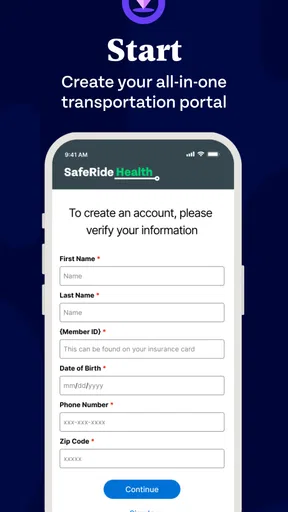
The setup process is straightforward. You start by entering your personal information, which the app uses to tailor your ride management needs. I found this aspect particularly handy as it ensures that everything from scheduling to notifications is personalized.
Features That Make a Difference
What sets MySafeRide apart are its thoughtful features. Here are some that caught my eye:
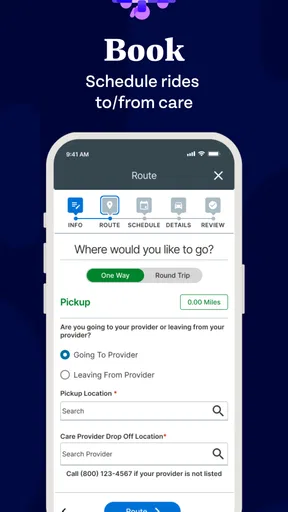
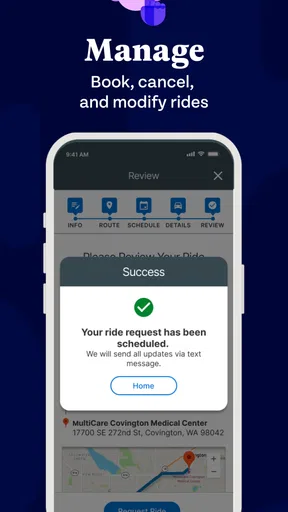
- Ride Scheduling: This feature is a lifesaver for people with hectic schedules. You can easily plan rides days in advance, ensuring you never miss an important appointment.
- Safety Alerts: MySafeRide excels in the safety department. The app sends notifications if you veer off your planned route or if there's a delay, giving you peace of mind.
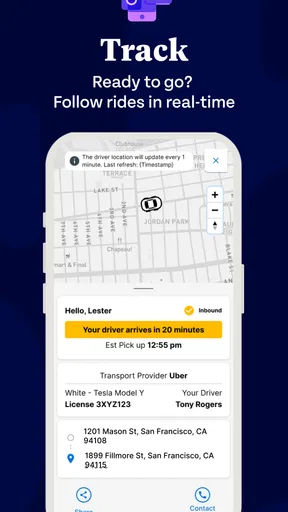
- Driver Tracking: Waiting for a ride can be a drag. Thankfully, the app's real-time tracking allows you to see exactly where your driver is, reducing the anxiety of not knowing.
- Expense Management: Keeping tabs on your spending is made easy with categorized expenses and detailed reports available at your fingertips.
These features aren’t just bells and whistles; they genuinely enhance the user experience by focusing on practicality and safety.
User Experience and Interface
Apps can often be tricky to navigate, but MySafeRide’s interface is refreshingly intuitive. The design is sleek, with a minimalistic approach that ensures you can find what you need without unnecessary clicks.
One thing I thoroughly enjoyed was the customization options. You can tweak settings according to your preferences, whether it's changing notification tones or adjusting privacy settings. It’s evident that user feedback has played a significant role in shaping the app’s functionality and design.
Using it without making it your only plan
For me, the most useful habit is to treat a scheduled ride as one part of appointment planning rather than the whole plan. I would verify the trip details in the app, then keep the appointment address and time somewhere easy to reach. If someone else is helping with the day, sharing the confirmed details directly is safer than assuming they can see the same account or notifications.
Notifications are most helpful when they can actually reach you. I would check that the phone is not silencing alerts from the app and that its notification previews do not expose information you would rather keep private. If the phone is offline, muted, or left behind, an alert cannot help in the moment; keeping the relevant trip details accessible gives you a simple backup.
There is also a useful distinction between monitoring a trip and confirming a trip. Seeing a driver’s position or receiving a delay alert can help you react, but it does not replace checking that the ride itself is correctly arranged. For a medical appointment, I would make that confirmation early enough to contact the plan if something looks wrong, instead of waiting until pickup time to discover a mismatch.
How it compares with other ways to arrange a ride
Compared with calling a plan or transportation service, a mobile app can be convenient when you want to handle routine details without starting a new conversation each time. The trade-off is that a screen-based workflow may be less reassuring when a trip has unusual needs or the account is not behaving as expected. A call gives you a person to explain the situation to; the app is more appealing when the request is familiar and the member is comfortable managing it on a phone.
Compared with general ride-hailing services, the health-plan focus is both the reason to choose it and the reason not to. A broad marketplace is often aimed at flexible, on-demand travel, while MySafeRide is relevant when a member is using transportation connected to their plan. I would not assume that the services share booking rules, vehicle options, or payment arrangements. If a trip is outside the plan’s process, a conventional taxi or ride service may be simpler, but it is a separate choice rather than a guaranteed substitute.
For a caregiver, the best workflow may be a mix: help the member confirm the plan’s requirements, let the member use the app where they can, and keep a separate note of appointment details and contact information. That avoids relying on one phone screen for every part of the day. It also makes it easier to adapt if the member needs assistance that the app’s normal booking flow does not cover.
Performance and Reliability
In terms of performance, MySafeRide holds its ground. During my time using the app, I experienced no lags or crashes—a testament to its solid build. The app doesn't drain your battery excessively, which is a critical factor for anyone relying on their phone throughout the day.
Reliability is paramount, especially with ride management apps, and MySafeRide delivers consistently. Notifications are prompt, and the GPS tracking is remarkably accurate. It’s clear that the developers have invested in a robust backend infrastructure.
What I would check before depending on it
Because this is a specialized service, the practical setup question is not just whether the app installs. I would first confirm access with the health plan, then make sure the member can sign in and recognize where trip details and updates appear. For an older adult or someone who has difficulty with small screens, it is worth walking through that process together before the first appointment rather than turning setup into a same-day task.
Another sensible check is whether the person who needs the ride can comfortably manage the phone during the trip. A caregiver may be able to help with advance planning, but the member still needs a workable way to notice changes or contact the relevant service. If the phone is unfamiliar or the person does not want to use apps, arranging the trip by phone may be the more considerate and reliable route.
MySafeRide is available free and is rated for Everyone, while its current version is 1.1.0 and it requires Android 6.0 or later. The age rating describes the app’s content, not whether a child should arrange medical transportation independently; an adult member or caregiver should handle access and trip planning where appropriate. I would also avoid treating an app rating as a guarantee of service quality for every plan, since people’s needs and booking circumstances differ.
The Final Verdict
After spending ample time with MySafeRide, I can confidently say it’s a game-changer for ride management. The app combines ease of use with powerful features that cater to both casual and frequent users. Whether you’re juggling multiple rides or simply want to enhance your safety and organization, this app has got your back.
With its strong emphasis on user experience and safety, MySafeRide is more than just an app—it’s your reliable travel companion. So, if you haven’t already, give it a whirl and see how it can transform your ride management experience.
My buy-or-skip take
I would try it if I were already a health-plan member looking for a dedicated way to coordinate eligible rides, especially when advance planning and trip updates would make appointment days less stressful. Its strongest potential value is in fitting into that specific routine, not in replacing every transport option. Since the app itself is free, the decision is mainly about whether the service matches your plan and whether you are comfortable managing the process on a phone.
I would skip it as my first choice if I needed general on-demand transportation, did not have access through a health plan, or wanted a person to handle every detail. In those situations, calling the plan or using a regular transport service may make more sense. For the right member, though, it is a sensible tool to try—provided the first booking is checked carefully and a backup contact method is kept handy.
Pros
- User-friendly interface enhances ease of use.
- Real-time ride tracking for added security.
- Multiple payment options available.
- Quick booking with minimal steps.
- 24/7 customer support for assistance.
Cons
- Limited availability in rural areas.
- Occasional app crashes reported.
- Requires constant internet connection.
- In-app ads can be distracting.
- Limited vehicle options in some regions.
FAQs for MySafeRide - Manage your rides
What features does MySafeRide offer to enhance ride management?
MySafeRide provides a comprehensive suite of features designed to simplify ride management. Users can schedule rides in advance, track drivers in real-time, and receive notifications for ride updates. The app also offers a secure payment system and the ability to rate and review drivers, ensuring a safe and tailored riding experience.
Is MySafeRide available on both Android and iOS platforms?
Yes, MySafeRide is available for download on both Android and iOS platforms. Users can find the app on the Google Play Store and the Apple App Store. This ensures accessibility and convenience for a wide range of smartphone users, allowing them to manage rides easily from their preferred device.
How does MySafeRide ensure user safety?
User safety is a top priority for MySafeRide. The app includes features like real-time tracking, driver background checks, and an SOS button for emergencies. Additionally, users can share their ride details with friends or family, ensuring they feel secure during their journey. These measures help create a trustworthy environment for riders.
What are the pros and cons of using MySafeRide?
Pros of MySafeRide include an intuitive user interface, reliable scheduling, and robust safety features. The app also supports multiple payment options. However, some users may find the pricing slightly higher compared to competitors, and availability may vary by region. Overall, it offers a dependable solution for ride management.
Can I use MySafeRide for group travel or only individual rides?
MySafeRide supports both individual and group travel arrangements. Users can select vehicle types that accommodate larger groups, making it convenient for family outings or group events. The app offers flexibility in choosing the right vehicle size, ensuring that all passengers travel comfortably and efficiently.


